Supplier document tracking for QA and procurement teams
Supplier document tracking with automatic renewal reminders
Keep supplier certificates, insurance, specifications and other required documents up to date. See what is missing or expiring, and send automatic reminders for replacements.
Built for regulated, audit-ready operations
What needs attention
See what is missing, expiring, and expired
Start with the documents that need attention. See which suppliers to follow up with and which renewals are coming next.
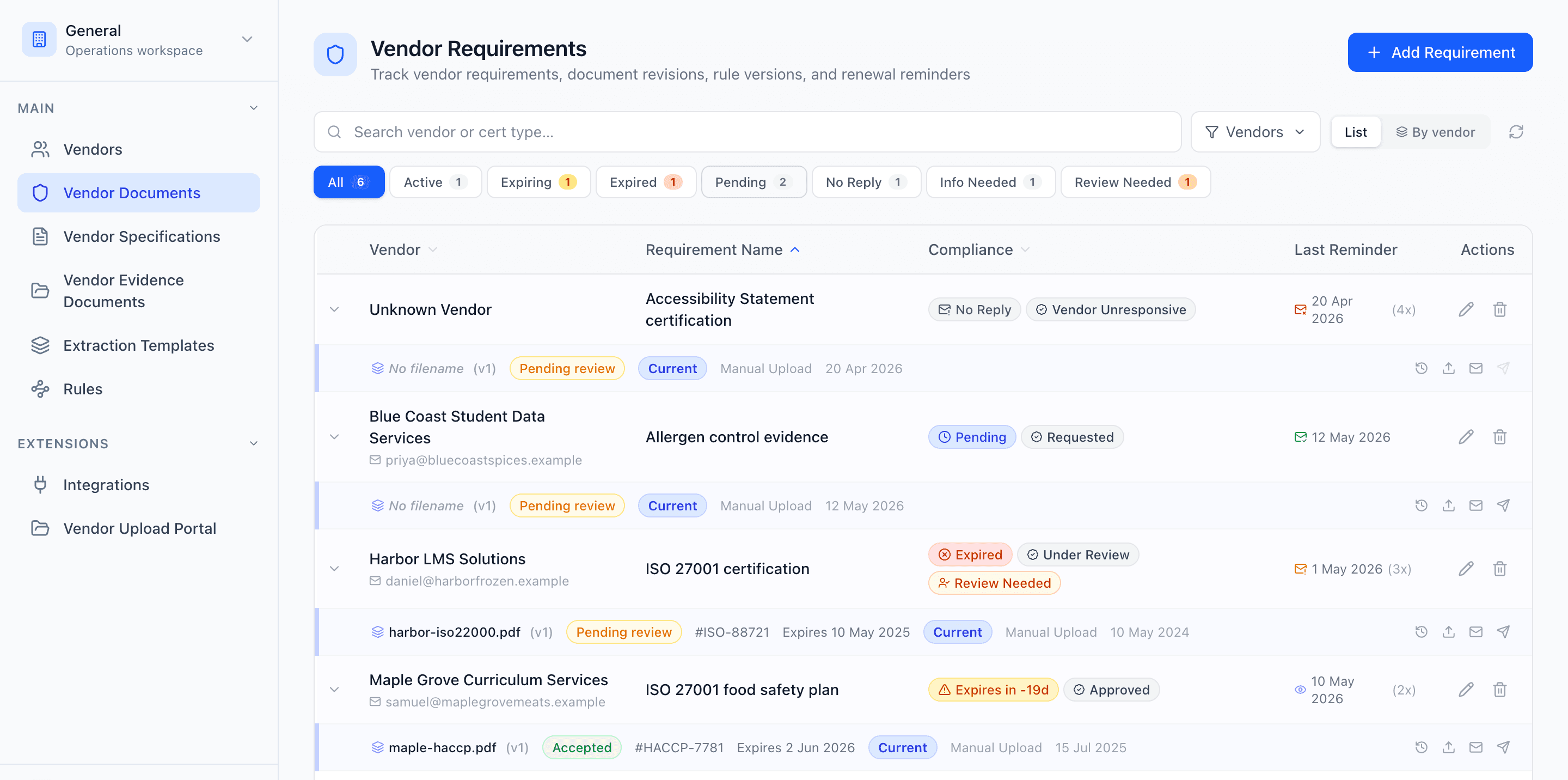
Your supplier documents in one list
Check each document's status and renewal date without opening individual files. Filter for upcoming expiries, expired documents or documents you are still waiting for.
- See which documents are valid, expiring, expired or missing
- Check how many days remain before a document expires
- Identify documents with an unknown expiry date or no expiry
Keep renewals moving with automatic follow-ups
Choose when Evidash should request a replacement and how often it should follow up. If the supplier does not respond, the request is escalated to the person responsible in your team.
- Set certificate expiry reminders, such as 60, 30 and 7 days before expiry
- Choose how often to follow up on unanswered requests
- See previous requests, delivery updates and supplier replies together
Getting documents back
Request updated documents without another email to write
Set a reminder schedule for each document or group of suppliers. Choose when requests start, how often to follow up and when an unanswered request should be escalated to your team. You can pause reminders for an individual supplier or document when needed.
Suppliers can reply with an email attachment or use the upload link in their request. The link shows the documents you are waiting for, so they can send several in one visit. They do not need an account or password.
Evidash confirms receipt and checks the document against your requirements. When those checks are conclusive, the status and any renewal date update automatically. Anything that needs review is flagged for your team, with the extracted details shown alongside the original document.
- Use different reminder schedules for different suppliers or documents
- Follow up automatically while you are waiting for a reply
- Choose when to stop reminders and alert your team
- Pause reminders when you have agreed a different arrangement
- Let suppliers send documents by email or upload link
Document types
Track the documents your suppliers need to provide
Keep different document types together, with the dates and checks that matter for each. Documents without an expiry date can still be tracked and checked against your requirements.
Certificates
Keep BRCGS, FSSC 22000, ISO, organic, halal and kosher certificates on file. Track their expiry dates and request updated copies.
Insurance documents
Track supplier insurance documents and policy end dates, with reminders to request updated proof of cover.
Specifications
Keep supplier specifications linked to the relevant requirements so your team can find and review the current documents.
Declarations and statements
Collect allergen, origin and sustainability statements and check them against your requirements, including any dates they contain.
Questionnaires and approvals
See which suppliers have provided the paperwork needed for onboarding or approval, and follow up on missing responses.
Test reports and COAs
Keep supplier test reports and batch-specific certificates of analysis linked to the relevant requirements, and identify missing documents.
How it works
How supplier document tracking works in Evidash
Set up suppliers and required documents
Add your suppliers and choose the documents they need to provide. Apply shared requirements to groups of suppliers to save setting up each one separately.
Capture the dates that matter
Evidash reads expiry and start dates from incoming documents. Your team can check and correct those details during review.
Identify missing documents and upcoming renewals
See what is missing, what has expired and what needs renewing soon. Use the filters to work through the documents that need attention.
Send requests and follow-ups
Choose your reminder schedule. Evidash requests updated documents, follows up if there is no reply and alerts your team when further action is needed.
Receive and review updated documents
Evidash checks incoming documents and updates their status when the checks are conclusive. Your team reviews anything flagged for attention.
The difference
Why not just use a spreadsheet?
Spreadsheet and inbox
- Enter renewal dates and update the spreadsheet when documents arrive
- Check upcoming deadlines and send reminder emails
- Search email threads to find the last supplier response
- Find the latest document across folders and attachments
- Compare the spreadsheet with your files to see what is missing
Evidash
- Dates are read from incoming documents and available to check
- Reminders follow the schedule you set
- Requests and replies stay with the relevant requirement
- Current documents are linked to the requirements they satisfy
- Filters show missing, expiring and expired documents, plus items needing review
Who it's for
For teams responsible for supplier documents
When a colleague or auditor asks for a supplier's documents, you need to know what you have and what still needs attention. Evidash keeps that information available to the people who need it.
- QA teams managing supplier approvals and document checks
- Procurement teams collecting documents and following up with suppliers
- Operations teams checking whether supplier requirements are met
- Food and drink manufacturers managing certificates, specifications and declarations
- Teams keeping several document types current across many suppliers
Explore more
Keep supplier information and documents together
Explore how supplier records, specification management and document checks support your tracking process.
Practical implementation guide
Set up your certificate renewal process
Learn how to record certificate dates, choose reminder schedules, request replacements and keep a history of supplier follow-ups.
Read the certificate expiry tracking guideFAQ
Supplier document tracking FAQs
Can I track documents other than certificates?
Yes. You can track insurance documents, specifications, declarations, questionnaires and test reports as well as certificates. Choose the information to check for each document type, including whether it has an expiry date.
Can Evidash remind suppliers before documents expire?
Yes. Choose when reminders should go out, such as 60, 30 and 7 days before expiry. You can use different schedules for different suppliers or documents, and pause reminders when needed.
Can it chase documents that are already missing or expired?
Yes. Evidash can request missing documents and replacements for expired ones. You choose how often to follow up and when unanswered requests should stop and be escalated to your team.
What happens when a supplier sends an updated document?
Evidash confirms receipt, links the document to the relevant requirement and checks its contents. Conclusive checks update the status and any renewal date automatically. If a review is needed, your team can compare the extracted details with the original document before deciding what to do.
Do suppliers need an account?
No. Suppliers can reply to the request email with an attachment or use the upload link to see and send the documents you are waiting for. They do not need to create an account.
How do I get started with my existing supplier documents?
Upload the documents you already hold and choose what each supplier needs to provide. Evidash checks the documents on file against those requirements, helping you see what is covered, what needs review and which documents to request next.
See how supplier document tracking works
Try the document list, reminder schedules and supplier upload page in the interactive demo. No account needed.