Subcontractor compliance software for construction teams
Subcontractor compliance software that keeps every record audit-ready
Centralize trade licences, insurance certificates, SWMS, induction records, and other subcontractor compliance evidence in one system. Evidash tracks expiries, reviews incoming evidence, and flags missing or non-compliant records before they become site, contract, or audit issues.
Encrypted in transit & at restHuman-in-the-loop reviewContinuous audit trail
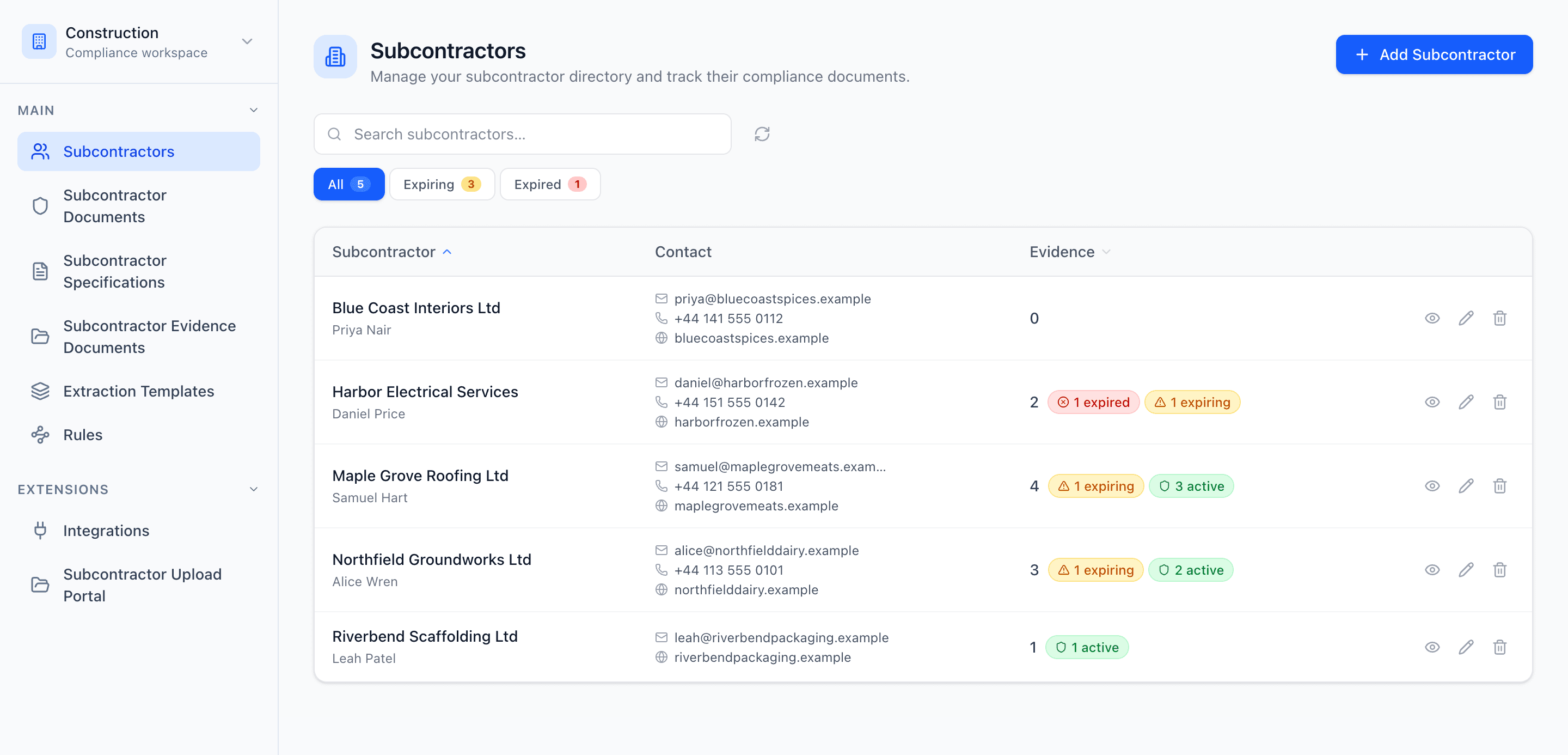
Built for licensed, insured, audit-ready site operations
Encrypted in transit & at restRuns on AWS infrastructureHuman-in-the-loop reviewContinuous audit trail
Why site teams switch
From scattered evidence to one system of record
Most construction teams run subcontractor compliance on inboxes, shared drives, and spreadsheets. Evidash replaces the guesswork with a single, controlled source of truth.
The status quo
- Licences and insurance scattered across inboxes and drives
- Expired cover discovered at site induction
- Hours lost to manual licence and SWMS entry
- Audit and client reviews turn into a fire drill
With Evidash
- Every document linked to its subcontractor and requirement
- Expiries flagged early, with chasing on autopilot
- AI extracts and standardizes licence and insurance data on intake
- A continuous audit trail, ready on demand
How it works
From incoming subcontractor evidence to controlled pre-start approvals
Plan which insurance, competency and site records to collect, who reviews them, and when they need renewing with our contractor compliance records checklist.
- 01
Define requirements
Set compliance requirements by subcontractor, trade, or project type with expiry rules and owner responsibility.
- 02
Capture and extract
Collect evidence from portals, email, or uploads, then use AI to extract metadata and classify each item automatically.
- 03
Validate against project standards
Use AI to map incoming evidence against current project requirements, routing edge cases to human review before pre-start approval.
- 04
Chase, sync, and prove
Automate subcontractor follow-ups by email, escalate when needed, and push approved outcomes to connected systems with a full compliance trail.
Capabilities
Built to keep every subcontractor on site compliant
From the moment a certificate arrives to the day a client or auditor asks for it.
Expiry tracking & chasing
Never let a subcontractor work on expired cover
Track required evidence for every subcontractor with expiry rules and clear ownership. Evidash surfaces what's expiring and chases subcontractors by email automatically — escalating to your team only when a human is needed.
- Status at a glance: active, expiring, expired
- Automated, scheduled subcontractor follow-ups
- Escalation only when a reply needs judgment
AI extraction & validation
Let AI check licences & insurance — keep your team in control
Evidash reads incoming certificates, SWMS, and emails, extracts the details that matter, and checks them against your current requirements. Every approval stays with your team through a clear review queue.
- Automatic data extraction from certificates and PDFs
- Validation against the active requirement version
- Human-in-the-loop approval for every exception
Audit readiness
Walk into any audit or client review prepared
Every record, requirement version, and review decision is captured with a timestamp. Show what was received, what was checked, and what was approved — without digging through inboxes.
- Complete history for every subcontractor and document
- Traceable requirement versions at time of review
- Export-ready evidence in minutes, not weeks
Problems we solve
When subcontractor compliance is fragmented, site risk compounds quickly
Most construction teams rely on inboxes, shared drives, and spreadsheets to manage subcontractor evidence. That creates blind spots, site delays, and audit stress. Evidash closes those gaps.
Expired licences and certificates are discovered too late
Lapsed trade licences, public liability insurance, or WHS compliance evidence is often caught only when a subcontractor is already on site or an audit begins. Evidash tracks expiry windows and automates subcontractor follow-up before issues escalate.
Subcontractor chasing gets stuck in email ping-pong
Teams waste cycles sending reminders and triaging replies for missing licences, insurance, and SWMS. Evidash can auto-reply, process incoming subcontractor emails, and escalate to humans only when intervention is needed.
SWMS and method statement review takes too long
When safe work method statements and method statements are reviewed manually, teams lose time and introduce inconsistencies. Evidash extracts and standardizes SWMS data, then keeps version history clear, searchable, and enforceable across projects.
Manual evidence entry creates bottlenecks and mistakes
Teams spend hours keying in subcontractor and document metadata from PDFs and emails. Evidash captures compliance evidence automatically, reducing admin load and improving data quality.
Manual document review slows pre-start approvals
Reviewing SWMS, induction records, and other pre-start evidence line by line is slow and error-prone. Evidash extracts and validates against current project requirements, with a human-in-the-loop review interface for exceptions.
Audit and incident preparation becomes a recurring fire drill
Evidence collection is painful when records are spread across project folders and inboxes. Evidash centralizes records, timelines, and decisions so compliance readiness is continuous, not last-minute.
Compliance readiness
Stay compliant across every project without last-minute scrambling
Keep subcontractor records, licence coverage, expiries, and document review history in one place so your team can quickly show what is current, what is missing, and what was checked.
When a WHS audit, client request, or incident investigation comes up, Evidash helps you move faster with organized subcontractor evidence, linked documents, and a clear record of what happened and when.
See what is missing before subcontractors arrive on site
Track required evidence by subcontractor, trade, or project. Spot missing, expired, and soon-to-expire licences, insurance certificates, and SWMS before they create site or audit issues.
Show current evidence and approved records fast
Keep trade licences, public liability insurance, WHS evidence, and SWMS tied to the right subcontractor and easy to find when a client, principal contractor, or regulator asks.
Prove what was reviewed before work started
Document what was received, what was extracted, what was checked against project requirements, what was flagged, and what action was taken. Give your team a clearer audit trail instead of scattered emails and project folders.
Keep SWMS and compliance decisions traceable
Link incoming subcontractor evidence to the relevant project or contract version so your team can show what standard was applied at the time of pre-start approval.
Reduce WHS audit and incident response time
Instead of chasing evidence across project inboxes, shared drives, and spreadsheets, prepare with one system that brings subcontractor records, expiries, SWMS, and review history together.
Designed for teams responsible for subcontractor compliance
WHS and compliance teams managing subcontractor conformance
Procurement and contracts teams owning subcontractor onboarding
Safety and governance teams preparing for WHS audits
Site and project managers needing faster, safer pre-start approvals
FAQ
Frequently asked questions
What does Evidash help construction compliance teams manage?
Evidash helps teams manage subcontractor records, compliance evidence, expiry tracking, SWMS data, and document review workflows in one system.
Is Evidash only for insurance certificates?
No. Evidash supports insurance certificates and a broader set of subcontractor compliance evidence, including trade licences, SWMS, induction records, WHS plans, and other pre-start documents.
Does AI replace human review in Evidash?
No. AI supports extraction, validation, and recommendations, but compliance teams keep final control through human-in-the-loop review and approval.
Can Evidash help with WHS audit readiness?
Yes. Evidash centralizes records, document history, and review decisions so teams can provide evidence faster and reduce last-minute WHS audit preparation work.
Is Evidash designed for principal contractors managing multiple subcontractors?
Yes. Evidash is built for construction businesses managing subcontractor compliance across multiple projects and trades. It supports the licence tracking, SWMS review, and audit evidence those environments require.
How does licence tracking and automated subcontractor chasing work?
Evidash tracks compliance requirements and expiry dates for each subcontractor. When licences, insurance certificates, or other controlled documents are approaching expiry or go missing, the system surfaces them automatically. Follow-up workflows can chase subcontractors by email without manual effort, escalating to your team only when direct action is needed.
Where is Evidash data hosted and how is it secured?
Evidash runs on AWS infrastructure. Data is encrypted in transit and at rest. The platform is built to the security standards expected by regulated construction businesses where data integrity and access control matter.
Does Evidash support approved subcontractor list management?
Yes. Evidash centralizes subcontractor records, compliance coverage, approval status, and evidence history. Teams can see which subcontractors are current, which have gaps, and maintain the evidence needed for approved subcontractor list management.
Does Evidash handle SWMS and method statement management?
Yes. Evidash supports SWMS and method statement management including AI-assisted data extraction, version control, and linking documents to incoming subcontractor evidence. Teams can track which SWMS version was active at the time of any pre-start approval.
Can Evidash automate subcontractor compliance tracking?
Yes. Evidash helps teams automate subcontractor compliance tracking by centralizing subcontractor records, tracking required documents and expiry dates, surfacing missing or overdue evidence, and supporting automated follow-up while keeping final review decisions with your team.
Make subcontractor compliance measurable, not manual
See how Evidash can reduce compliance risk, shorten pre-start approval cycles, and give your team confidence in every subcontractor decision.